Live Deploy Setup
Live deploy streams commands directly into a running Packet Tracer instance, so devices, cables and configs appear in real time as your AI builds them.
There are two channels, and the server picks one per command automatically:
                                   ┌─ HTTP bridge (:54321) ──▶ extension webview ─┐
LLM ──▶ MCP Server (:39000) ──────►┤   (window OPEN)                             ├─▶ PT Script Engine
                                   └─ file mailbox (%LOCALAPPDATA%) ──▶ Script ──┘
                                       (window CLOSED)               Engine loop
- HTTP is used while the MCP Control Center window is open — the webview
polls
:54321and runs each command. - The file-bridge takes over when the window is closed but Packet Tracer
is still open: the Script Engine (which has no
XMLHttpRequestbut can read files) polls a mailbox under%LOCALAPPDATA%\packet-tracer-mcp\bridge\(req_*.js→ execute →res_*.txt). So PT keeps executing with the window minimized or closed.
_pick_channel() chooses exactly one per command, so nothing runs twice.
| Port | Service | Purpose |
|---|---|---|
| 39000 | MCP server (streamable-http) | Receives tool calls from the LLM/editor |
| 54321 | HTTP bridge | Queues JS commands while the extension window is open |
Install the extension (one-time)
Live deploy uses the project's own Packet Tracer extension — the
MCP Control Center (a .pts script module shipped in this repo's Releases).
You do not need any third-party extension.
- Download the latest extension from
Releases
(the
.ptsfile — currentlyV5.2.pts). - In Packet Tracer: Extensions → Scripting → Configure PT Script Modules
- Click Add…, select the downloaded
.pts, and confirm.
That's it — the module is now registered.
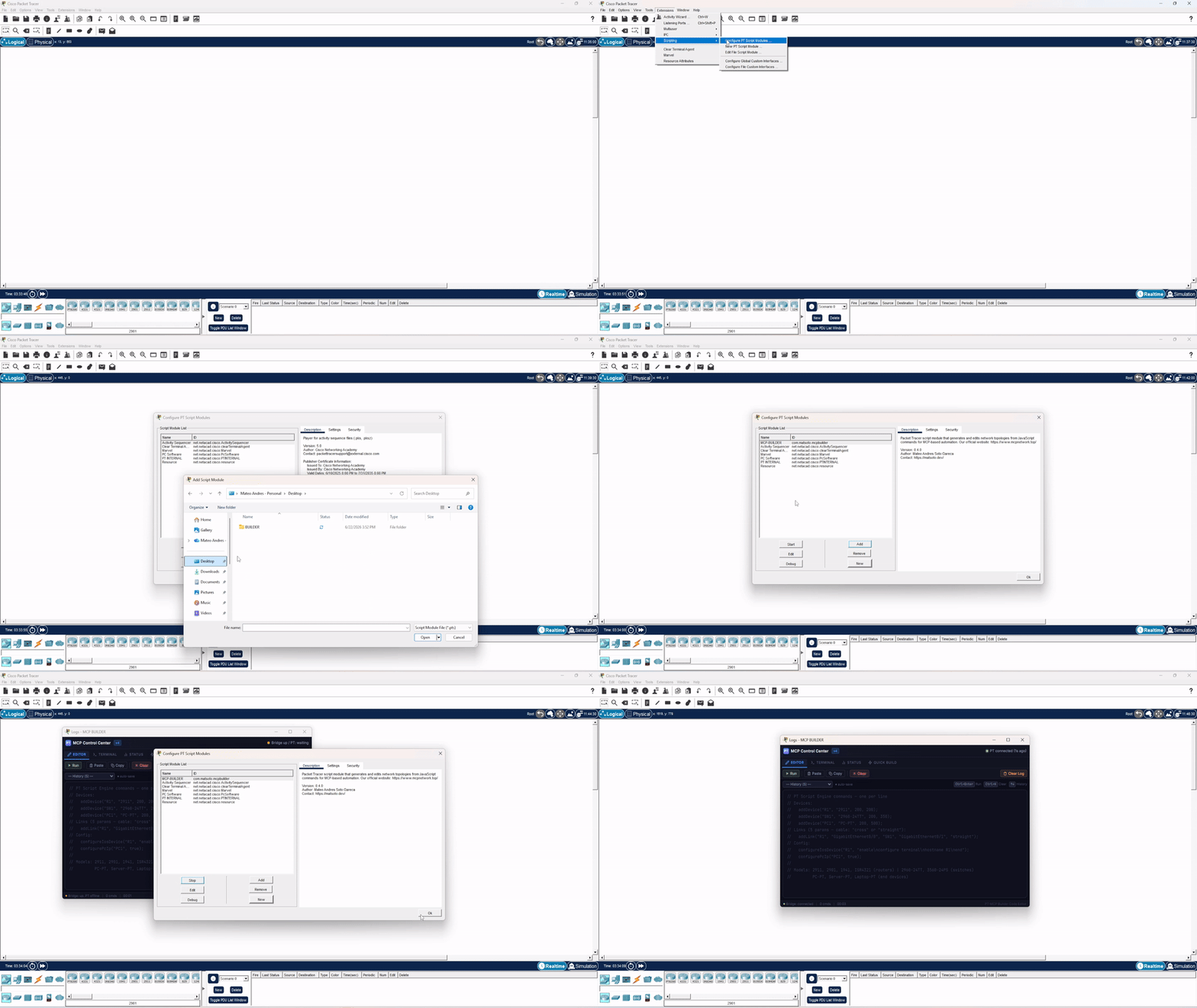
Use it (each session)
- Open Cisco Packet Tracer 8.2+
- Open Extensions → MCP BUILDER — the MCP Control Center window appears.
- It auto-connects to the bridge and starts polling. No snippet to paste.
No bootstrap needed
The MCP Control Center has the polling loop built in (it polls :54321 every
500 ms and runs commands via the Script Engine), so it connects on its own. The
Editor / Terminal / Status / Quick Build tabs let you watch and drive it live.
Authentication (nothing to do)
Since v0.6.0 the bridge requires a token unique to your machine — without it, any web page you visited while PT was open could inject and run code inside Packet Tracer. The MCP server creates the token on first run and the extension reads it through PT's Script Engine. Nothing to configure, nothing to paste.
If the Terminal tab reports that no token was found, start the MCP server once and reopen the window. Extensions built before V5.0 cannot authenticate.
Keep it responsive
If Packet Tracer feels sluggish while the window is in the background, minimize it (don't just push it behind PT). See the troubleshooting note below.
Verify and deploy
pt_bridge_status          # → "Bridge ACTIVE and CONNECTED"
pt_live_deploy(plan_json) # streams the topology into PT
pt_query_topology         # read back what's in PT
pt_export_topology        # full snapshot (positions, per-interface IPs, links)
Troubleshooting
I don't see Extensions → MCP BUILDER
The extension isn't registered yet. Repeat the install step
(Extensions → Scripting → Configure PT Script Modules → Add…) and pick the
.pts from Releases.
A red error popup appeared (An error occurred on line N)
A command threw inside the Script Engine. The Control Center's polling loop lives
in the webview, so it keeps running, but the popup blocks PT's UI until dismissed.
Click OK and re-run. Prefer the validated tools (pt_add_device,
pt_add_link, …) which pre-check inputs before sending.
Packet Tracer becomes very slow when the window is in the background
A QtWebEngine compositing limitation: when the webview is behind PT but not minimized, Chromium keeps rendering and competes for the GPU. Minimize the MCP Control Center window to stop its render pipeline. See #5.